Gilbert, AZ
(623) 888-9993

Blue screen, freezing, won't boot

Computer Diagnostics & Troubleshooting

Stop guessing what is causing system freezes, blue screens or boot failures. Ken runs thorough hardware and software diagnostics to isolate the exact issue, then gives you clear, honest repair options.

Blue screens get read from the crash dump

A blue screen or a sudden restart leaves evidence behind. Windows writes a crash dump and logs the STOP error, and that record points at whatever failed. Ken reads those files instead of reinstalling Windows and hoping for the best. When you call or text (623) 888-9993 from anywhere in Gilbert or the East Valley, his first question is what the machine did in the minutes before it went down, because that tells him which entries in the log to read first.

What he is hunting for falls into three groups: a corrupt driver, a damaged registry entry, or hardware that is failing. Each has a different fix and a different bill, which is why the cause comes first and the quote second. Two checks do the sorting. The Hardware Integrity Check covers RAM, motherboards, power supplies and storage drives. Software & OS Verification covers system files, registry entries and driver conflicts. Between them, the machine gets ruled in or out piece by piece.

Computer Paramedics is owner-operated, so the person who reads the dump is the person who fixes the machine. Nothing gets handed to a second shop floor, and nobody reads you a script. Drop the PC off at 1060 S Pueblo St in Gilbert for bench testing, or book an on-site visit within 30 miles when carrying a tower to the car is the harder part of the day.

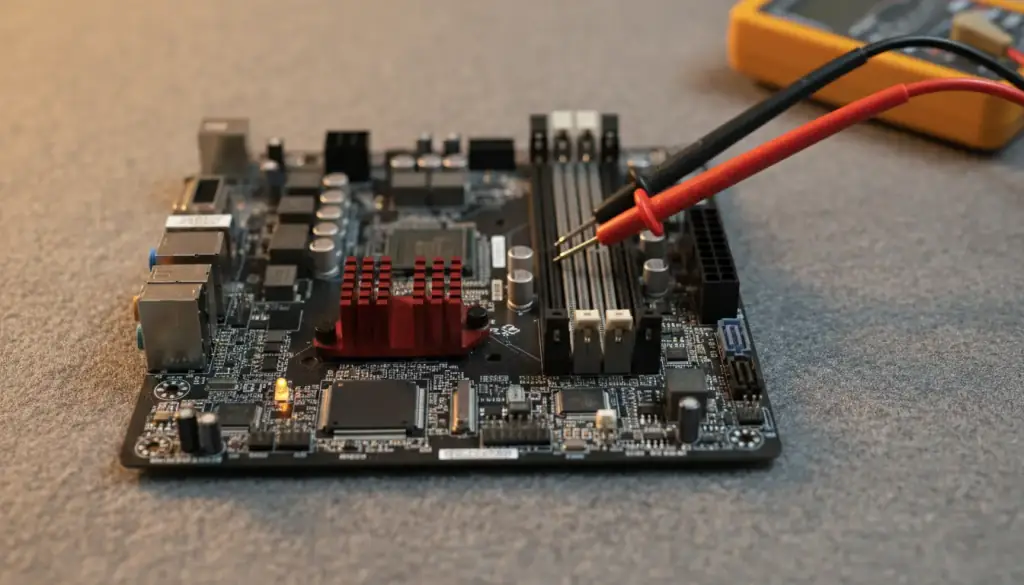
Desktop motherboard on an anti-static mat with multimeter probes on a power connector

Desktop motherboard on an anti-static mat with multimeter probes on a power connector

Sudden shutdowns: heat and power get stress-tested

A computer that shuts off without warning is rarely being random. Overheating and unstable power delivery are the two usual suspects, and from the outside they look identical: the screen goes black, the fans stop, and then the machine seems fine until the next time. Ken stress-tests the power supply and the cooling system together, loading the machine until the fault shows itself on the bench instead of waiting for it to happen again at your desk.

That is what On-Site & In-Shop Testing means in practice. You can bring the machine to Ken, or he can inspect it directly at your home or office, and you settle which suits the problem when you call. A desktop that only crashes under heavy load is a natural fit for the bench and its test tools. A machine tied into your office setup may be easier to judge where it sits. The phone is answered every day, 9 to 6.

Not every failing machine is as hopeless as it looks. Shayne Guffey wrote in his Google review that several people told him his gaming laptop was non-repairable, and Ken repaired it within a day. A stress test is how you find out which kind of machine is on the bench before anyone calls it dead, and it is why a second opinion from Ken is worth a phone call.

Slow boots: the startup list, then the plain-English diagnosis

A machine that takes minutes to reach the desktop is usually carrying too much. Unnecessary startup programs and background tasks pile up, and each one fights for the same memory and disk time the moment you press the power button. Ken scans for the resource-heavy processes, isolates the ones doing the damage, and separates them from the ones that are harmless, so you hear what is actually slowing the boot rather than a vague guess.

Whatever the test finds, the order of events does not change. The system is evaluated first, the root cause is explained in plain language, and you get a clear breakdown of the repair cost before any work begins. That is the Transparent Cost Estimates standard, and the promise is simple: no surprise fees and no upsells you did not ask for. If you say no after hearing the cause and the cost, the machine goes home as it came.

Older machines get an honest weighing too. Ken compares the repair against a comparable replacement and recommends the practical option, which is not always the bigger job. You also stay in the loop while he works: Sydney McKinzie says in her Google review, “He calls with updates.” That holds from the first test to the pickup at 1060 S Pueblo St.

“other companies told me it would take them 2-3 days to get my PC back fixed! Ken did it within hours!” Michael Lopez, Google review

How a case gets charted

Symptom in, diagnosis out, and the cost before the work

Ken works each complaint the same way. Here is what gets tested and what you are told for the four that bring people to Computer Paramedics most.

Diagnostic chart

Gilbert bench

Blue screen or STOP error

Tested: Crash dumps and system logs, drivers, registry entries, RAM and storage.

You are told: Which driver, entry or part failed, and what fixing or replacing it costs.

Shuts off by itself

Tested: The power supply and the cooling system, stress-tested together.

You are told: Whether it is heat, power delivery or something on the board, and the cost of each fix.

Slow to start

Tested: Startup programs, background tasks and the processes eating resources.

You are told: What is slowing the boot, and whether the cure is a clean-up or a part.

Will not boot at all

Tested: Storage, power and system files, tested on the bench until the cause is isolated.

You are told: The root cause in plain language, then a clear breakdown of the repair cost.

Not on the chart? Describe what the screen is doing and Ken will tell you where it fits. Other customers have written about it on the reviews page.